2011-10-23
Whoops - Stalled!
No SICP posts for over a week! Well, everyone has to take a holiday at some point.

SICP Exercise 2.51: Below and Below Again
Define the
below operation for painters. Below takes two painters as arguments. The resulting painter, given a frame, draws with the first painter in the bottom of the frame and with the second painter in the top. Define below in two different ways -- first by writing a procedure that is analogous to the beside procedure given above, and again in terms of beside and suitable rotation operations (from exercise 2.50). Here's the procedure
beside:
(define (beside painter1 painter2)
  (let ((split-point (make-vect 0.5 0.0)))
    (let ((paint-left
           (transform-painter painter1
                              (make-vect 0.0 0.0)
                              split-point
                              (make-vect 0.0 1.0)))
          (paint-right
           (transform-painter painter2
                              split-point
                              (make-vect 1.0 0.0)
                              (make-vect 0.5 1.0))))
      (lambda (frame)
        (paint-left frame)
        (paint-right frame)))))
This takes two painters and applies transformations to them such that the first painter is squashed into the left-hand side of a frame, while the second painter is squashed into the right-hand side of the frame... Assuming, of course, that the frame is orientated normally. I.e. with the origin at the bottom left-hand corner, edge1 defining the bottom side of the frame, going from left to right, and edge2 defining the left side of the frame, going from bottom to top. We can express this mapping graphically as follows:

below, except we want the mapping produced to divide the frame into two horizontal stripes, one above the other. Graphically this is:

split-point, (0, 0.5) instead of (0.5, 0), and this split-point needs to split edge2 rather than edge1. And we need to rename a few variables. Other than that, it's pretty similar:
(define (below painter1 painter2)
  (let ((split-point (make-vect 0.0 0.5)))
    (let ((paint-down
           (transform-painter painter1
                              (make-vect 0.0 0.0)
                              (make-vect 1.0 0.0)
                              split-point))
          (paint-up
           (transform-painter painter2
                              split-point
                              (make-vect 1.0 0.5)
                              (make-vect 0.0 1.0))))
      (lambda (frame)
        (paint-down frame)
        (paint-up frame)))))
And putting this to the test with...
((below wave spiral) window)...gives:

beside puts its first painter on the left-hand side of the frame and its second on the right-hand side. We want below to put the first painter underneath the second painter. Graphically we can view this as the following rotation:

rotate90, which was introduced in the section "Transforming and combining painters". Unfortunately, as the image above shows, this translation also has the effect of rotating the contents of the painters by 90° anti-clockwise. We need to compensate for this by rotating each of the painters themselves by 90° clockwise, which is equivalent to rotating by 270° anti-clockwise and is encapsulated in the procedure rotate270 which we defined in exercise 2.50.Here's what we get when we put these two sets of rotations together:
(define (below painter1 painter2)
  (rotate90 (beside (rotate270 painter1)
                    (rotate270 painter2))))
As you'd expect, this gives identical results to the first version above.
2011-10-11
SICP Exercise 2.50: Flipping Painters
Define the transformation
flip-horiz, which flips painters horizontally, and transformations that rotate painters counterclockwise by 180 degrees and 270 degrees. Okay, so first of all here's our default frame:
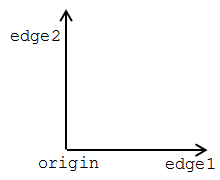
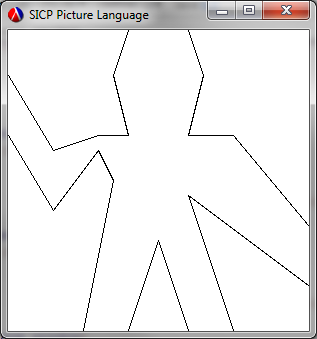
origin is at (0, 0), edge1 is the horizontal edge, ending at (1,0) and edge2 is the vertical edge, ending at (0, 1). And for comparison with later images, here's what we get when we invoke (wave window):
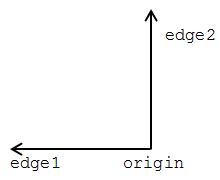
origin is at (1, 0), edge1 is still the horizontal edge, but goes in the oposite direction and ends at (0,0) and edge2 is still the vertical edge, but is on the right of the frame, ending at (1, 1). This translates directly into the following transformation:
(define (flip-horiz painter)
  (transform-painter painter
                     (make-vect 1.0 0.0)
                     (make-vect 0.0 0.0)
                     (make-vect 1.0 1.0)))
Calling ((flip-horiz wave) window) gives us:
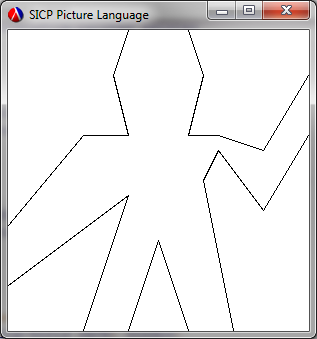
origin to the opposite corner and pulls the edges around with it:
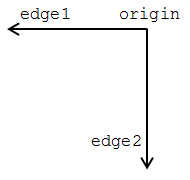
origin is at (1, 1), edge1 is still the horizontal edge, but is at the top of the frame and goes in the oposite direction, ending at (0, 1), and edge2 is still the vertical edge, but is on the right of the frame and is inverted, ending at (1, 0). This gives us the following transformation:
(define (rotate180 painter)
  (transform-painter painter
                     (make-vect 1.0 1.0)
                     (make-vect 0.0 1.0)
                     (make-vect 1.0 0.0)))
Calling ((rotate180 wave) window) gives us:

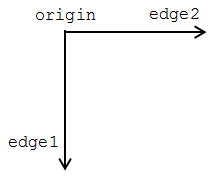
origin is at (0, 1), edge1 is now the (inverted) vertical edge on the left-hand side, ending at (0, 0), and edge2 is now the horizontal edge at the top, ending at (1, 1). So our final transformation is:
(define (rotate270 painter)
  (transform-painter painter
                     (make-vect 0.0 1.0)
                     (make-vect 0.0 0.0)
                     (make-vect 1.0 1.0)))
Calling ((rotate270 wave) window) gives us:
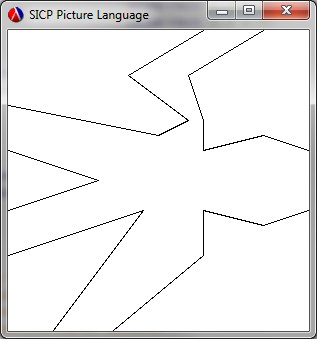
Subscribe to:
Posts (Atom)